
Self-host Omnara
Your own managed agent platform on one private VM. No model API keys.
Shelley handles the setup. About 15 minutes.
Prefer a terminal?
curl -fsSL https://exe-staging.dev/deploy/omnara/prompt.txt | ssh exe.dev new --prompt=/dev/stdinOmnara is an open-source managed
agent platform, a self-hostable alternative to Claude Managed Agents and
OpenAI's Agents API. You define agents in YAML (instructions, model, tools,
MCP servers, skills, memory) and talk to them from its dashboard, its API
and TypeScript SDK, Slack, Discord, GitHub, or a schedule. Every turn is
kept in a PostgreSQL event log, so agents pick up where they left off.
Their commands run on machines you connect with a small daemon, omnarad.
This page runs all of it on one exe.dev VM:
- Omnara's own Compose stack, pinned to the release we tested (0.2.15, October 30), private behind exe.dev login.
- Models from exe.dev's LLM gateway: GPT, GLM, Kimi, Grok, and more. A small relay, compose.exe.yaml, sits next to Omnara's API and worker, so no model key is stored anywhere.
- The VM itself as your agents' first machine, as a user without sudo.
Note
Omnara is a young project, released every few days. This page pins 0.2.15 and runs it in Omnara's development mode, for the reasons in the FAQ. Treat it as a private platform for you and your team, not a public service.
What you get#
- Omnara 0.2.15's whole Compose stack at your VM's private URL, started at boot by omnara.service
- A relay to exe.dev's LLM gateway that lists its models, so agents need no model API key on the VM
- Signup, password reset, and invitation emails sent through exe.dev, with no mail account
- A user, omnara-agent, ready to be your agents' machine, without sudo and cut off from the stack's databases
- Omnara's encryption keys in ~/omnara/.env, mode 600
- Nightly backups of the database, artifacts, and memory, with the first one taken and checked
What's running, and where
https://my-omnara.exe.xyz/
Omnara's dashboard and API, behind exe.dev login, then Omnara's own
https://my-omnara.exe.xyz/
Teammates you share the VM with, each with their own Omnara account
Deploy with Shelley#
Click Deploy and Shelley will set up Omnara on a new VM, then check that it works. No config-file wrangling required.
Prefer a terminal?
curl -fsSL \
  https://exe-staging.dev/deploy/omnara/prompt.txt \
  | ssh exe.dev new --prompt=/dev/stdin
When it's done, run this on your computer (only you can):
ssh exe.dev share add my-omnara teammate@example.comWhat Shelley is told
Set up Omnara on this VM by following the exe.dev recipe at https://exe-staging.dev/deploy/omnara.md from top to bottom.

The recipe's example VM name is my-omnara. This VM's name is the output of `hostname`: use it wherever the recipe writes my-omnara. Skip the step that creates the VM; you are on it.

You are done when all of these are true. Check each one yourself:
- Omnara 0.2.15's whole Compose stack at your VM's private URL, started at boot by omnara.service
- A relay to exe.dev's LLM gateway that lists its models, so agents need no model API key on the VM
- Signup, password reset, and invitation emails sent through exe.dev, with no mail account
- A user, omnara-agent, ready to be your agents' machine, without sudo and cut off from the stack's databases
- Omnara's encryption keys in ~/omnara/.env, mode 600
- Nightly backups of the database, artifacts, and memory, with the first one taken and checked

Read the whole recipe, including the closed details. Follow "Install by
hand" from "On the VM", skipping VM creation and SSH: Docker, Omnara,
.env, the stack, omnara.service, the omnara-agent user, and backups.
Work as exedev in ~/omnara. Never overwrite an existing .env, and never
print its contents. Don't sign up, create organizations, or connect a
machine: the owner does those in the browser with their own password,
and the machine token comes from their dashboard. Don't send test
emails. Don't share the VM or make it public. Verify that /healthz says
ok, that the relay lists models, and that api-mail's log says it is
listening, then point the owner to "Sign up".

Finish with the URLs I should open and these commands, which only I can run, from my own computer (with this VM's name in them):
  ssh exe.dev share add my-omnara teammate@example.com
Also at /deploy/omnara/prompt.txt. The recipe it follows is /deploy/omnara.md.
Install#
Deploy sets up the stack, the agents' user, and backups on a new VM. To do it yourself:
Install by hand
On your computer:
ssh exe.dev new --name=my-omnara
ssh my-omnara.exe.xyz
Get Omnara#
On the VM, start Docker, fetch Omnara at the tested release, and add this page's Compose additions and backup script:
sudo systemctl enable --now docker.service
git clone --branch cluster-v0.2.15 --depth 1 \
  https://github.com/omnara-ai/omnara ~/omnara
cd ~/omnara
curl -fsSLO https://exe-staging.dev/deploy/omnara/compose.exe.yaml
curl -fsSLO https://exe-staging.dev/deploy/omnara/exe-mail.py
curl -fsSLO https://exe-staging.dev/deploy/omnara/backup.sh
chmod +x backup.sh
compose.exe.yaml adds the LLM relay and the mail bridge, keeps
PostgreSQL, Valkey, and RustFS off the VM's ports, and makes them start
again after a reboot. exe-mail.py
is the mail bridge: a small SMTP server, reachable only from Omnara's API,
that hands each message to exe.dev's email gateway.
Write the settings#
This makes .env, mode 600, with new encryption keys, and refuses to
overwrite one that exists. Omnara needs the same keys to read the secrets
it stores, so backup.sh saves .env with everything else.
(umask 077; set -o noclobber; cat > ~/omnara/.env <<EOF
COMPOSE_FILE=compose.yaml:compose.exe.yaml
COMPOSE_PROFILES=app
OMNARA_RELEASE=v0.2.15
OMNARA_PUBLIC_URL=https://$(hostname).exe.xyz
OMNARA_ALLOW_INSECURE_DEV_DEFAULTS=1
OMNARA_SECRET_ENCRYPTION_KEYS='{"k1":"$(openssl rand -base64 32)"}'
OMNARA_SECRET_ENCRYPTION_ACTIVE_KEY_ID=k1
OMNARA_SKILL_DOWNLOAD_SIGNING_KEY=$(openssl rand -base64 32)
OMNARA_EMAIL_DRIVER=smtp
OMNARA_EMAIL_FROM=omnara@$(hostname).exe.xyz
OMNARA_SMTP_ADDR=127.0.0.1:2525
OMNARA_SMTP_REQUIRE_TLS=0
EOF
)
Start it#
Run the stack at boot with a small unit, which also brings up the relays after the containers they join:
sudo tee /etc/systemd/system/omnara.service >/dev/null <<EOF
[Unit]
Description=Omnara (docker compose)
Requires=docker.service
After=docker.service network-online.target
Wants=network-online.target

[Service]
Type=oneshot
RemainAfterExit=yes
User=$USER
WorkingDirectory=$HOME/omnara
ExecStart=/usr/bin/docker compose up -d --remove-orphans

[Install]
WantedBy=multi-user.target
EOF
sudo systemctl daemon-reload
sudo systemctl enable --now omnara.service
cd ~/omnara
until curl -fs http://localhost:8000/healthz; do sleep 3; done; echo
docker compose exec -T worker-llm curl -fsS http://127.0.0.1:8090/v1/models | head -c 200; echo
docker compose logs api-mail
The first start pulls about 2 GB of images, in under a minute. Expect
{"status":"ok"}, the start of the gateway's model list, and
exe-mail listening on 127.0.0.1:2525.
Make the agents' user#
Agents run their commands as omnara-agent, which has no sudo and no
Docker. Lingering keeps its daemon running when nobody is logged in, and
the slice setting blocks it from Docker's networks, where the stack's
databases listen with Omnara's default passwords:
sudo useradd -m -s /bin/bash omnara-agent
sudo loginctl enable-linger omnara-agent
sudo systemctl set-property user-$(id -u omnara-agent).slice \
  IPAddressDeny=172.16.0.0/12
docker network inspect omnara-control-plane -f '{{range .IPAM.Config}}{{.Subnet}}{{end}}'
The subnet should be inside 172.16.0.0/12 (172.16 to 172.31). You
connect the daemon after signing up, in
Give agents a machine.
Set up nightly backups#
backup.sh stops Omnara's API, worker, and maintenance for a few seconds,
so the database, artifacts, and memory are copied together, and keeps the
14 newest backups in ~/omnara-backups.
sudo tee /etc/systemd/system/omnara-backup.service >/dev/null <<EOF
[Unit]
Description=Back up Omnara to ~/omnara-backups
Requires=docker.service
After=docker.service

[Service]
Type=oneshot
User=$USER
ExecStart=$HOME/omnara/backup.sh
EOF
sudo tee /etc/systemd/system/omnara-backup.timer >/dev/null <<'EOF'
[Unit]
Description=Back up Omnara every night

[Timer]
OnCalendar=*-*-* 03:30:00
RandomizedDelaySec=30m
Persistent=true

[Install]
WantedBy=timers.target
EOF
sudo systemctl daemon-reload
sudo systemctl enable --now omnara-backup.timer
sudo systemctl start omnara-backup.service
cd ~/omnara
latest=$(ls -1t ~/omnara-backups/omnara-*.tar.gz | head -n 1)
tar -tzf "$latest"
tar -xzOf "$latest" ./omnara.dump |
  docker compose exec -T postgres pg_restore --list | grep -c 'TABLE DATA'
Expect .env, omnara.dump, volumes.tar, and the three files you
downloaded, then a
count of tables (78 in 0.2.15). Installation done; continue with
Sign up.
Sign up#
Open https://my-omnara.exe.xyz/, sign in to exe.dev if asked, and click
Sign up with the email of your exe.dev account. A verification email
comes from exe.dev within a minute. Open its link, choose a password (12
characters or more), and create an organization. It comes with a project
called Default.
exe.dev only delivers to addresses it knows (see the FAQ). The bridge writes a refused message to its log, link and all; to find the newest link, on your computer:
ssh my-omnara.exe.xyz 'cd omnara && docker compose logs --no-log-prefix api-mail' |
  grep -o 'https://[^ ]*?token=[0-9a-f]*' | tail -n 1
Add the models#
In Models, click New provider:
- Choose the OpenAI preset and name it
exe-llm. - Under API key, make a new secret with any value, say
unused. The relay drops it; exe.dev adds the real credentials. - Under Advanced, set Base URL to
http://127.0.0.1:8090/v1and keep the API format OpenAI Responses. - Click Add provider. Omnara lists the gateway's models: pick a few,
say
gpt-6.1-solandgpt-6-luna, share them with the Default project, and add them.
127.0.0.1:8090 is the relay inside Omnara's containers, not a port on
the VM, so nothing else can reach it.
Give agents a machine#
In Machines, click Connect machine, name it omnara-vm, share it
with the Default project, and copy the machine token (it's shown
once). Then on the VM, paste the token when asked:
read -rsp 'Machine token: ' token; echo
sudo -iu omnara-agent env XDG_RUNTIME_DIR=/run/user/$(id -u omnara-agent) \
  DBUS_SESSION_BUS_ADDRESS=unix:path=/run/user/$(id -u omnara-agent)/bus \
  OMNARA_API_URL=http://localhost:8000/api/v1 OMNARA_MACHINE_TOKEN="$token" \
  sh -c 'curl -fsSL http://localhost:8000/install/omnarad.sh | sh'
unset token
Expect omnarad restarted, and the machine shows Online in the
dashboard. The daemon is a systemd user service of omnara-agent, keeps
its token in ~omnara-agent/.omnarad/daemon.json, and updates itself
from Omnara's stable releases. Check it with
sudo -iu omnara-agent .omnarad/bin/omnarad status.
Make an agent#
In Agents, click New agent, switch to YAML, name it, and paste:
version: v1
instruction: |
  You are an engineering assistant. Use your machine to run commands.
model:
  provider_config: exe-llm
  name: gpt-6.1-sol
machine_sources:
  - machine_name: omnara-vm
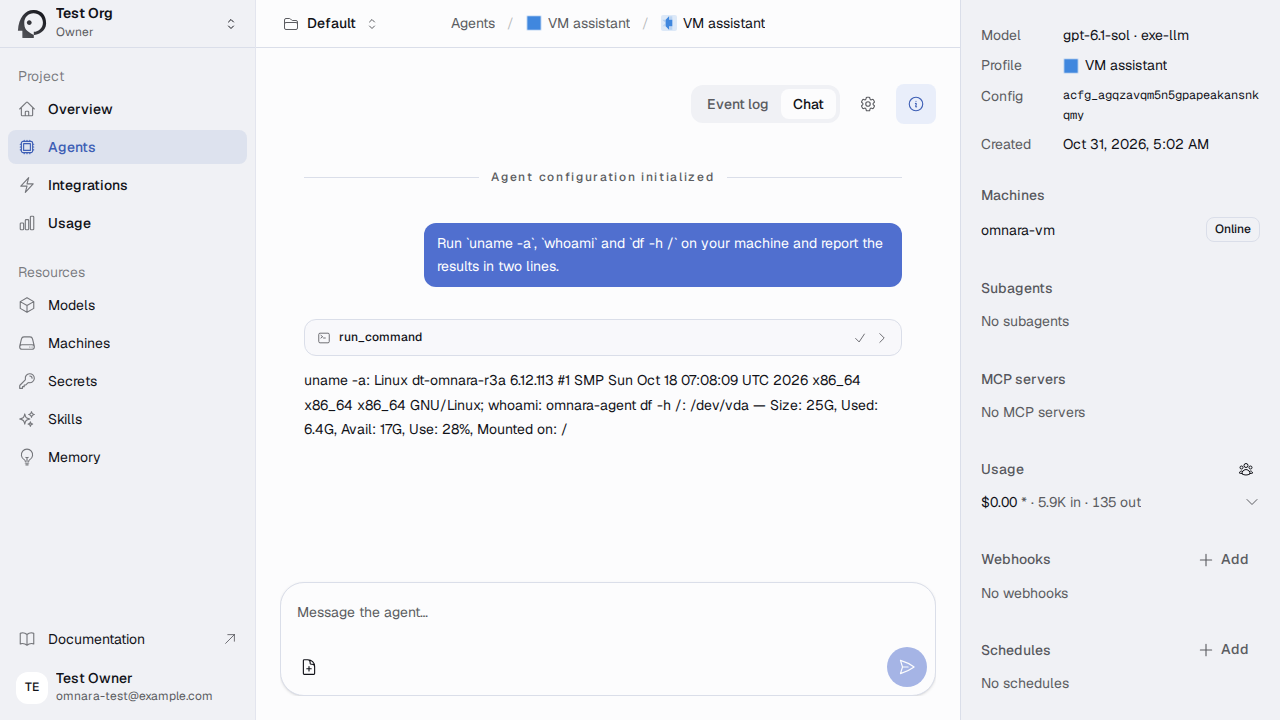
Click Create & launch agent, open Chat, and ask it to run
uname -a and df -h /. The
agent configuration docs
cover tools, MCP servers, skills, memory, subagents, and schedules.
Use the API#
With All projects selected, open API Tokens and create an org
token. On the VM, the API is at http://localhost:8000/api/v1, and the
chat's cURL and TypeScript SDK tabs show ready-made calls:
curl http://localhost:8000/api/v1/orgs -H "Authorization: Bearer $OMNARA_TOKEN"
From elsewhere, https://my-omnara.exe.xyz/api/v1 is behind exe.dev
login too. Send an exe.dev VM token as
well, which the proxy removes before Omnara sees the request:
ssh exe.dev ssh-key generate-api-key --vm=my-omnara --label=omnara-api
curl https://my-omnara.exe.xyz/api/v1/orgs \
  -H "X-Exedev-Authorization: Bearer $EXE_VM_TOKEN" \
  -H "Authorization: Bearer $OMNARA_TOKEN"
Bring your team#
Share the VM, on your computer:
ssh exe.dev share add my-omnara teammate@example.com
They sign up at https://my-omnara.exe.xyz/ with the email the VM is
shared with, as you did. Then invite them in Members (with All
projects selected); they get an email and accept when they sign in.
Compared with the hosted platforms#
- Claude Managed Agents: Anthropic runs the agent loop, sessions, and memory, on Claude only. That page gives each session a VM for its tools. Less to run, but your agents live on Anthropic's platform.
- OpenAI Agents SDK: a library. You write the agent in Python and that page gives each sandbox session a VM. More code, full control.
- Omnara: the platform itself, on your VM, with any model. You get its dashboard, API, triggers, and event log, and you keep it running and updated.
Back up and restore#
Backups run nightly; ~/omnara/backup.sh takes one now and prints its
path. Each holds the database, the artifact and memory volumes, and
.env. Copy them off the VM now and then, on your computer:
scp 'my-omnara.exe.xyz:omnara-backups/*.tar.gz' .
Restore a backup
On the VM, this replaces Omnara's data with the newest backup's:
cd ~/omnara
backup=$(ls -1t ~/omnara-backups/omnara-*.tar.gz | head -n 1)
mkdir /tmp/omnara-restore && tar -xzf "$backup" -C /tmp/omnara-restore
cmp -s .env /tmp/omnara-restore/.env || echo "Keys differ: see below"
docker compose stop api-llm worker-llm api-mail api worker maintenance
docker compose exec -T postgres dropdb -U omnara --force omnara
docker compose exec -T postgres createdb -U omnara omnara
docker compose exec -T postgres pg_restore -U omnara -d omnara --no-owner \
  < /tmp/omnara-restore/omnara.dump
docker run --rm -i -v omnara_rustfs-data:/rustfs-data -v omnara_memory-data:/memory-data \
  postgres:18-alpine sh -c 'find /rustfs-data /memory-data -mindepth 1 -delete && tar -C / -xf -' \
  < /tmp/omnara-restore/volumes.tar
docker compose up -d
rm -rf /tmp/omnara-restore
If the keys differ, as on a new VM, copy the backup's .env over
~/omnara/.env before stop, with the VM's name changed in
OMNARA_PUBLIC_URL and OMNARA_EMAIL_FROM. Connect the machines again afterwards.
Update#
Omnara moves fast: read the
release notes first. Then,
with the new release's number in place of 0.2.15:
cd ~/omnara
./backup.sh
v=0.2.15
git fetch --depth 1 origin tag cluster-v$v && git checkout cluster-v$v
sed -i "s/^OMNARA_RELEASE=.*/OMNARA_RELEASE=v$v/" .env
docker compose up -d
The migrate service upgrades the database before the API starts. Newer
releases are untested here; if one misbehaves, restore the backup with
the old release checked out.
Troubleshooting#
- Logs:
cd ~/omnara && docker compose logs -f api worker. - After stopping the API or worker, use
docker compose up -d, notstartorrestart: the relays share their network, andupbrings them back too. - A model call can't reach
127.0.0.1:8090: the relay is down. Rundocker compose up -d, then the relay check from Install by hand. - A model is refused as not in the integration's model list: your LLM integration doesn't serve it. Pick another, or enable that provider in the integration.
- Links point to the wrong address, or the API refuses requests for your
VM's name:
OMNARA_PUBLIC_URLin.envmust behttps://<vm>.exe.xyz. Rundocker compose up -dafter changing it. - No email arrives:
docker compose logs api-mailshowssentor why exe.dev refused it, followed by the message. Only you, your team, and people the VM is shared with can get Omnara's email. - The machine stays Offline:
sudo journalctl _UID=$(id -u omnara-agent) -n 30andsudo -iu omnara-agent .omnarad/bin/omnarad status.
Frequently asked questions#
How does this compare with Claude Managed Agents and the OpenAI Agents API?
With those, the provider runs the agent loop, sessions, and memory, and you bring at most the machines its tools run on; see Claude Managed Agents and the OpenAI Agents SDK. Omnara is the whole platform, open source, on your VM: agent configs, event logs, schedules, Slack, Discord and GitHub triggers, an API and SDK, with any model. In exchange you run and update it, and it's young (0.2).
Do I need an Anthropic or OpenAI API key?
No. Agents call exe.dev's LLM gateway through a relay on the VM, and exe.dev adds the credentials on the way out. To use your own provider key or ChatGPT account, point your LLM integration at it; Omnara doesn't change.
Can agents use Claude?
Yes, if your LLM integration serves Claude: add a second provider with the Anthropic preset and the same base URL, http://127.0.0.1:8090/v1.
Why does .env say OMNARA_ALLOW_INSECURE_DEV_DEFAULTS?
Omnara's production mode refuses model endpoints on private or loopback addresses, which rules out the relay, and wants STARTTLS from its SMTP server, which the mail bridge (on loopback, inside the API's container) doesn't offer. Development mode allows both. Its built-in default keys only fill settings you leave empty, and this page sets real ones. The VM stays behind exe.dev login, so strangers never reach Omnara.
Who can Omnara email?
Whoever exe.dev's email gateway allows: you, your exe.dev team, and people you've shared the VM with. That covers everyone who can reach Omnara behind exe.dev login. A refused message is written to the bridge's log, link included; see Sign up.
What can the agents do on the VM?
Run commands as omnara-agent, in /home/omnara-agent, with internet access and the integrations attached to the VM, but no sudo, no Docker, and no route to the stack's databases. For root, or for heavy work, give agents a machine of their own, such as one of the sandbox providers Omnara supports.
What does it cost?
Omnara is free and Apache-2.0. The VM is part of your exe.dev plan, and agents' model calls use your exe.dev LLM allocation. The stack uses about 700 MB of memory and 6 GB of disk when idle.
Updated Oct 31, 2026 · tested end to end Oct 31, 2026 · Markdown · manifest.json · Something wrong? Tell us


